The district business directory allows members to showcase and promote their personal businesses from their profiles. Members are opted out by default and need to manually opt in to the business directory to share their business information. If the district chooses not to use the feature or allow members to opt in, you may opt out of the business directory for the entire district.
This support article goes over how district administrators may request to opt their district out of using the business directory, or to opt back in.
Disabling the business directory for the district will prevent any member from opting in through their personal profile.
For more information on how members may opt in to the business directory, please read: How do I opt in to the business directory?
-
To begin, log in to your account through your district homepage, then click on Member Area in the top right-hand corner. Alternatively, click here to go directly to the ClubRunner login page.
-
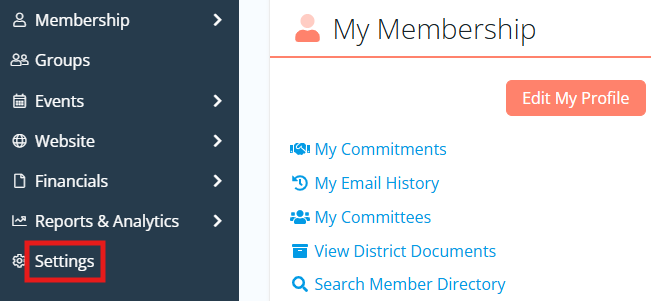
Click Settings in the left-hand navigation menu.
-
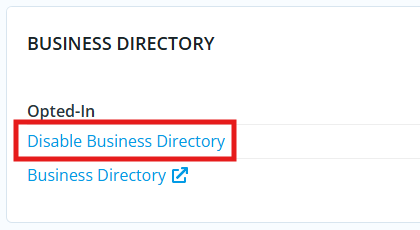
In the Business Directory section you will see the district's current opt-in status, a link to the opt-out or opt-in form, and a quick link to the district's public business directory. To change the opt-in status, click Disable Business Directory or Enable Business Directory as needed.
-
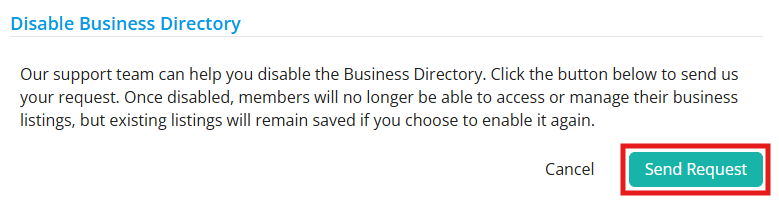
To confirm the change, click the Send Request button, which will send a notification to our Support team to process the request.
-
Our Support team will get in touch to confirm the requested change has been actioned for the district.