


If your club has set up ClubRunner as a View & Edit vendor in Rotary International, the club executive information in the Club & District database can be synchronized to Rotary to grant access to the executives in Rotary's systems. If ClubRunner was added as a View-Only vendor for Rotary, the club executive positions will only be available for copying into the club's ClubRunner database.
This support article will show you how to use the Executive Compare and Synchronize tool to review and update your officer information across ClubRunner and Rotary International.
To learn more about setting up Rotary integration, please see the support article: How do I set up automatic integration with Rotary International?
Only Active members are allowed to hold defined club executive positions, Honorary members will not sync between ClubRunner and RI. The single exception is the Executive Secretary position, this person can be Active, Honorary or an Other User.
-
To begin, log in to your account through your club homepage, then click on Member Area in the top right-hand corner. Alternatively, click here to go directly to the ClubRunner login page.
-
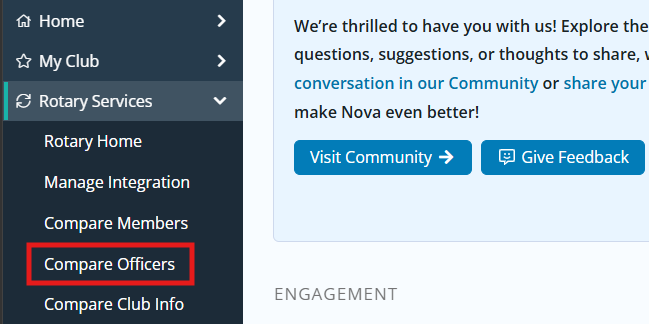
Click the arrow next to Rotary Services in the left-hand navigation menu, then click Compare Officers.
-
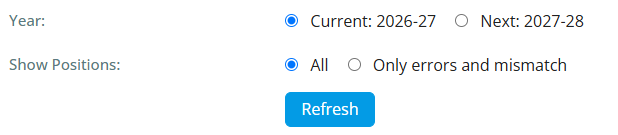
At the top of the following page, you will see filter options to select whether to view information for the current or following Rotary year. You may also select whether to review all officer sync information or only display roles with errors or mismatches between ClubRunner and RI. Click the Refresh button to update the displayed information based on your selection.
-
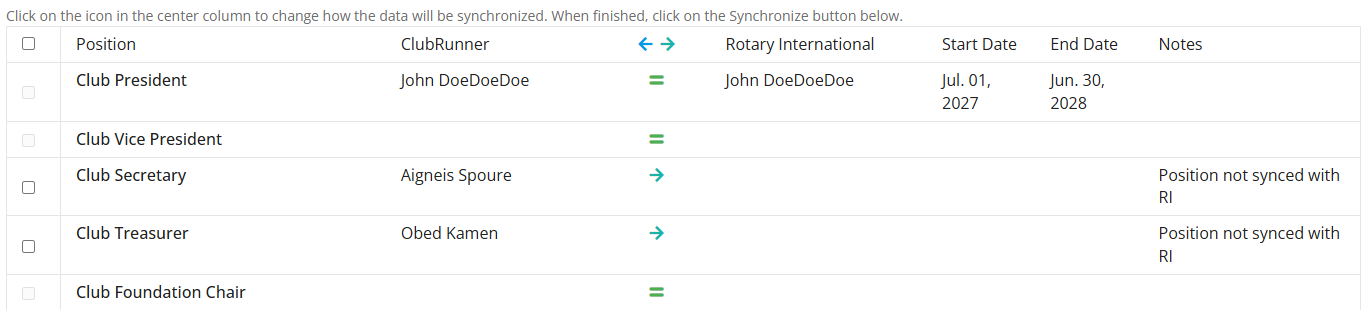
Once loaded, you will see the executive positions listed on the left-hand side of the page, and the Rotary International positions on the right-hand side. Any positions with the same member listed on either side will display an equals sign denoting the member and position match across both systems.
 Note
By default, the Executive Compare & Synchronize page will list the six following positions once RI integration is enabled for the club:
- Club President
- Club Vice President
- Club Secretary
- Club Treasurer
- Club Foundation Chair
- Club Executive Secretary/Director
- Club Membership Chair
If the following positions have been set up on the district level, they will be available for integration as well. The positions can be set by a district administrator by using the steps outlined in this support article: How do I define Executive & Director positions for clubs?
- Club Service Projects Chair
- Club Public Image Chair
- Club Learning Facilitator
- Rotaract Learning Faciliator
- Club Community Corps Advisor
- Rotaract Community Corps Advisor
Please note that the President-Elect position does not sync between ClubRunner and RI. When you define your President Elect, it will automatically add them as the upcoming year President.
-
If any positions are missing or mismatched in either system, an arrow will appear. Toggle the checkbox to the left-hand side for each position you wish to match, then click the arrow to change the direction the data will be copied. If the arrow points to the left-hand side, this will allow for copying the information from RI into ClubRunner, whereas a right-hand-facing arrow will send the information from ClubRunner to RI.
-
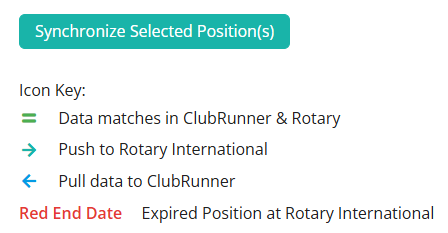
With the desired positions checked and data direction reviewed, click the Synchronize Selected Position(s) button at the bottom of the page. This will send the executive position to Rotary or copy the executive position from Rotary into the club database, depending on the arrows selected for each checked position.
-
The page will reload and you should see that the positions are matched or the changes are pending to be processed using the RI integration.