


The chair position for your club's committee may change from year to year. This article covers how to change a commitee chair to another member.
-
To begin, log in to your account through your club homepage, then click on Member Area in the top right-hand corner. Alternatively, click here to go directly to the ClubRunner login page.
-
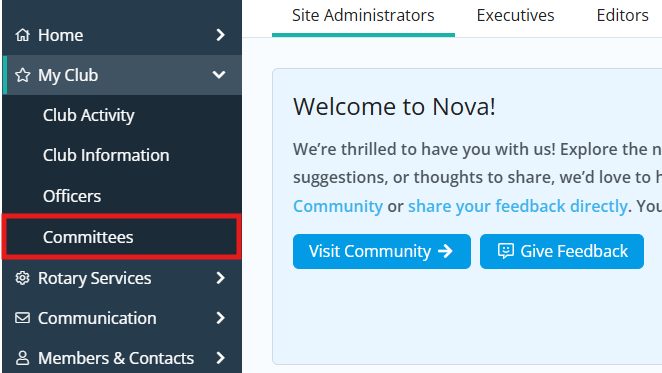
Click the arrow next to My Club in the left-hand navigation menu, then click Committees.
-
Find the committee you wish to edit in the list. You will see action icons on the right-hand side of the committee. Click the pencil icon to edit the committee’s details.

-
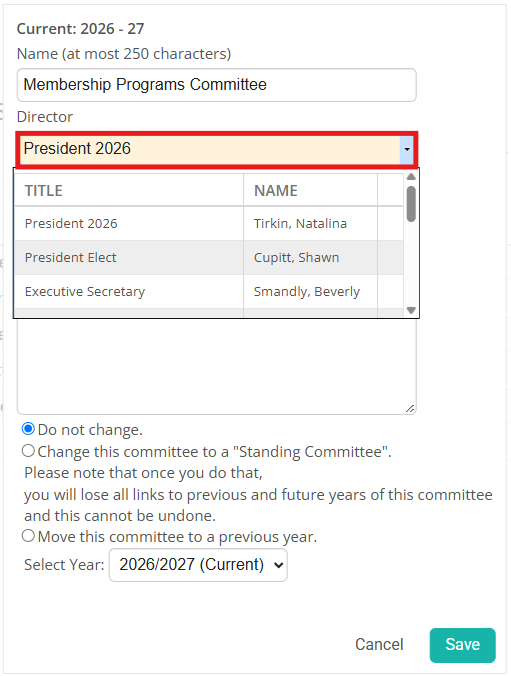
A pop-up box will appear, displaying the information for the committee. Click the Director drop-down menu, then click the name of the executive who is taking over the committee.
 Note
NoteIf the member does not appear in this list, please ensure that the member has been added to the Club Executives and Directors list by using the steps in this article: How do I edit our club officers?
-
Click Save to apply your changes.